IQOS orders.
Everything you need to know to easily place, track, and manage IQOS orders – all in one place.
Easily manage your order online.
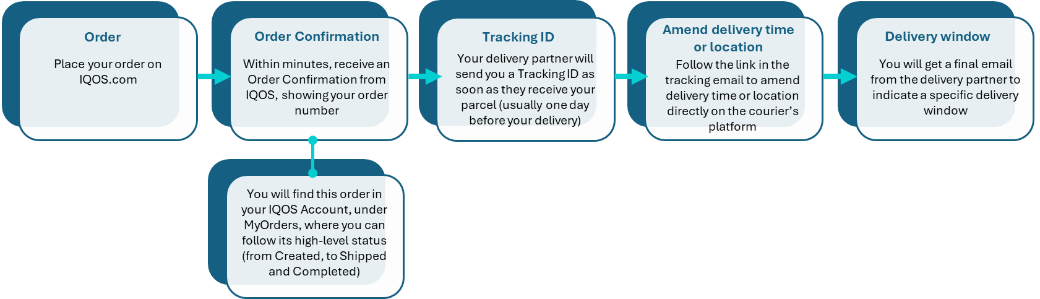
Once you place an order, you will immediately receive an email confirmation from IQOS.
Once your order is with the delivery partner, they will send you an email with all the tracking information you need, and keep you updated on the progress of your parcel.
Change of delivery address / date: any changes to your delivery location or time can only be done directly via the delivery partner website. You can easily access it via the link provided in their email updates
Re-order your favourite products
Log into your account and go to MyOrders, select your favourite order and simply click on “Order again”.
Set up a subscription
Login to your account and go to the My IQOS.com Subscription page where you can choose your flavours and how many TEREA/LEVIA sticks, VEEV pods, and ZYN cans you’d like delivered and then choose how often you would like a delivery (every 2 weeks, monthly or every 2 months). Then enter your payment details and accept the terms and conditions.
You will always be able to edit any aspect of your regular service anytime you need, right up until to the cut-off Date before each order, this is when we process your order for delivery. You’ll find this date at the top of your account dashboard, in My IQOS.com Subscription.
If you have placed an order and changed your mind, you can cancel it within 30 minutes
- How? Go to IQOS.com and log into your account. In the section “MyOrders”, select your order and click on the “Cancel my order” button.
Please note that you will still be charged for this order but a refund will be processed within 10 working days.
- If you have missed the cancellation window, you can always return your order free of charge and get a full refund.
On IQOS.com, in MyOrder, you can find the following details about your order:
- Order Summary
- Billing information
- Payment method used
- Total cost, including taxes and delivery fee
- Any discounts applied
- Delivery address
Please note:
You can find the most up to date tracking information via our delivery partners platforms/website.
You can easily access it via the link provided in their email updates.
In MyIQOS Subscription, you can find the following details about your subscription:
- Next order date
- Order frequency
- Delivery address
- Payment method used
- Order summary
From your subscription view, you can edit your delivery, skip or cancel your subscription.
Quick payments and easy refunds.
We offer trusted payment methods. And if you change your mind, we can refund you.*
Choose any of our secure payment options:
- Bank card (credit/debit): Visa, Mastercard, American Express
- PayPal
- Klarna
Refund timeline and conditions
Please allow up to 10 working days after we receive your return for the refund to be processed
*Check your eligibility and conditions for refunds.
How to apply discounts
If you have received a discount link, make sure you access IQOS.com through the link. Your discount will be automatically applied. No code needed. The e-mail where you received the link will have the full terms and conditions of the discount.
No discount? From time to time we run special discounts online and in store.

IQOS deliveries
From tracking to timing, get all the information you need to follow your IQOS order’s journey.

IQOS returns
From sending back online orders to recycling, find all you need for easy returns and refunds.