Skip To Main
  • Shop
    • See all products series
      Discover the new device colour Shop now
    • IQOS ILUMA Devices Shop the new device colour – Electric Purple
      Next level innovation Discover technology
    • TEREA tobacco sticks
    • Accessories
    • Compare devices
  • Discover IQOS
    • How IQOS works? Discover the world of IQOS
      Discover the new device colour Shop now
    • What is heated tobacco? Benefits, Functionality and Technology
    • What is TEREA? Discover TEREA tobacco sticks
    • Discover IQOS ILUMA and technology
    • Science behind IQOS
    • News
  • Services & privileges
    • Services & privileges
      Care you can count on Discover now
    • Pay monthly
    • Get support
    • Circular programme
  • Support
    • FAQs Find the best answers to your questions
    • Warranty Expert care and a convenient service experience
    • Get Support Find personalized guides and solutions for device
  • Find a store
  • Important Info
  • 562C2D68-971C-429B-AA1D-B87DA05127F8
  • Shop Explore products and buy
    • Shop
    • See all products series
    • IQOS ILUMA Devices Shop the new device colour – Electric Purple
    • TEREA tobacco sticks
    • Accessories
    • Compare devices
    Discover the new device colour Shop now
  • Discover IQOS Discover the world of IQOS
    • Discover IQOS
    • How IQOS works? Discover the world of IQOS
    • What is heated tobacco? Benefits, Functionality and Technology
    • What is TEREA? Discover TEREA tobacco sticks
    • Discover IQOS ILUMA and technology
    • Science behind IQOS
    • News
    Discover the new device colour Shop now
  • Services & privileges Care you can count on
    • Services & privileges
    • Services & privileges
    • Pay monthly
    • Get support
    • Circular programme
    Care you can count on Discover now
  • Support
    • Support
    • FAQs Find the best answers to your questions
    • Warranty Expert care and a convenient service experience
    • Get Support Find personalized guides and solutions for device
  • My Account
  • Find a store
  • Important Info
  • My Account
  • Arabic
  • English
562C2D68-971C-429B-AA1D-B87DA05127F8

Lights not turning on

    Let’s identify the right device part that is causing the issue

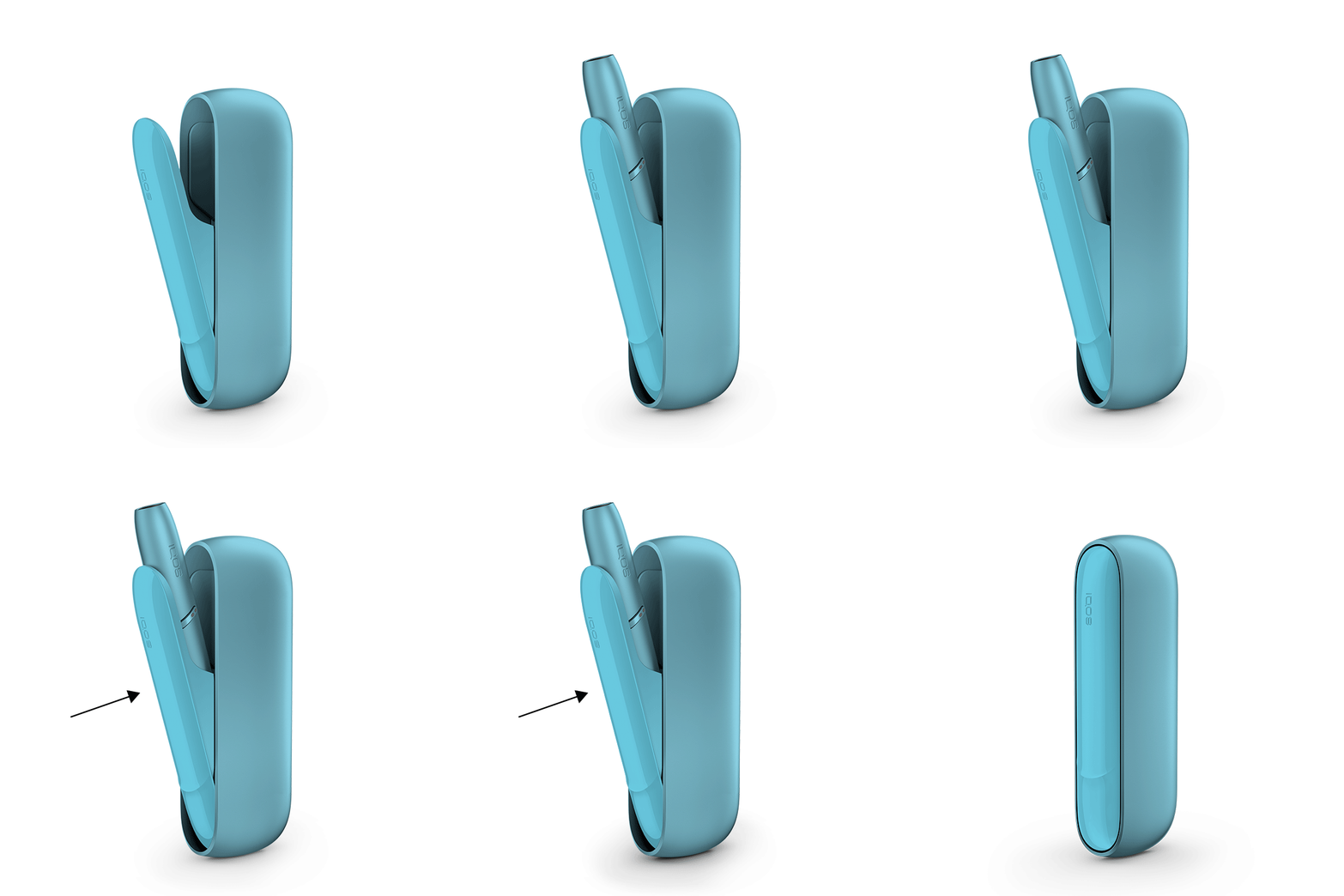
    1. Place the holder inside the pocket charger. Ensure to place it correctly.

    Metal connector of the holder should be at the bottom of the pocket charger.

    2. Briefly press and release the pocket charger button and observe which option you are seeing from the below;

    a. The pocket charger (strip lights) are briefly turning ON, the holder status (rounded lights) are OFF. This means your pocket charger is working, but holder is still not.

    b. No lights turning ON. This means your pocket charger may have an issue.

After these steps, please choose the suitable option from below
Option A Option B

No lights on the pocket charger

    Your device might be OFF

    1. Keep the holder inside the pocket charger. Ensure to place it correctly.

    Metal connector of the holder should be at the bottom of the pocket charger.

    2. Press the pocket charger button for 4 seconds to turn your device ON. Remember, the same action applies to turn it OFF as well. Turning OFF the pocket charger will also turn OFF the holder.

After these steps, is your device back on working?
Yes No

Issue Resolved

    Congratulations! We are happy that you can continue enjoying your IQOS ORIGINALS DUO Pocket Charger.

    If you need further assistance with your device, please use our online diagnostic tool or contact our Customer Care Center:

    800MYIQOS (694767)

    We are frequently introducing new product options. See what’s new by visiting us online at one of our retail stores.

    This product is not risk free and provides nicotine, which is addictive. Only for use by adults.

FINISH

No lights on the pocket charger

    Your pocket charger might be discharged

    1. Ensure the optimal charging for your device;

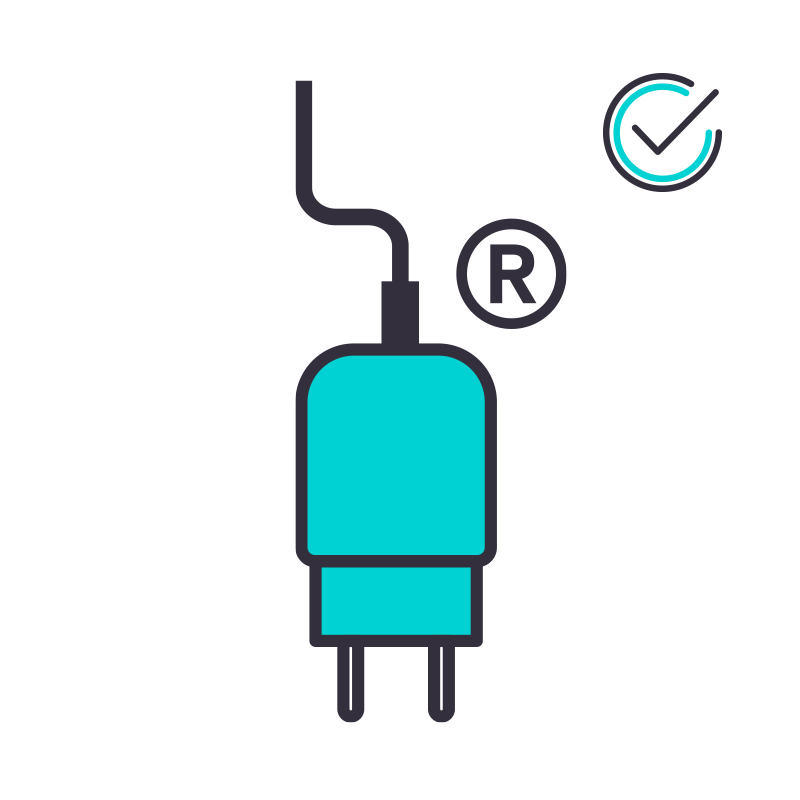
    ● Use official IQOS power adaptor and cable. Unofficial ones may interrupt the charging.

    ● Refrain from charging with a laptop. This may also interrupt the charging

    2. Place the holder back inside the pocket charger. Ensure to place it correctly.

    ● Metal connector of the holder should be at the bottom of the pocket charger.

    3. Plug the pocket charger into a wall power outlet

    ● While the pocket charger is being charged, strip lights will be pulsing.

    ● Seeing a light on a deeply discharged pocket charger may take up to 20 minutes. See the demonstration.

After these steps, did your pocket charger start to be charged?
Yes No

Issue Resolved

    Congratulations! We are happy that you can continue enjoying your IQOS ORIGINALS DUO Pocket Charger.

    If you need further assistance with your device, please use our online diagnostic tool or contact our Customer Care Center:

    800MYIQOS (694767)

    We are frequently introducing new product options. See what’s new by visiting us online at one of our retail stores.

    This product is not risk free and provides nicotine, which is addictive. Only for use by adults.

FINISH

Let’s diagnose your pocket charger!

    For being able to diagnose and to replace the correct device part (if eligible), please visit “my devices” section, choose your respective “POCKET CHARGER”, and proceed with pocket charger diagnostics.

    IQOS CUSTOMER CARE

FINISH

Pocket charger ON, holder status OFF

    Your holder might not be getting charge from your pocket charger

    1. Ensure the optimal charging for your device;

    ● Use official IQOS power adaptor and cable. Unofficial ones may interrupt the charging.

    ● Refrain from charging with a laptop. This may also interrupt the charging.

    ● Clean the contacts between pocket charger and holder.

    2. Place the holder back inside the pocket charger. Ensure to place it correctly.

    ● Metal connector of the holder should be at the bottom of the pocket charger.

    3. Perform RESET for your device;

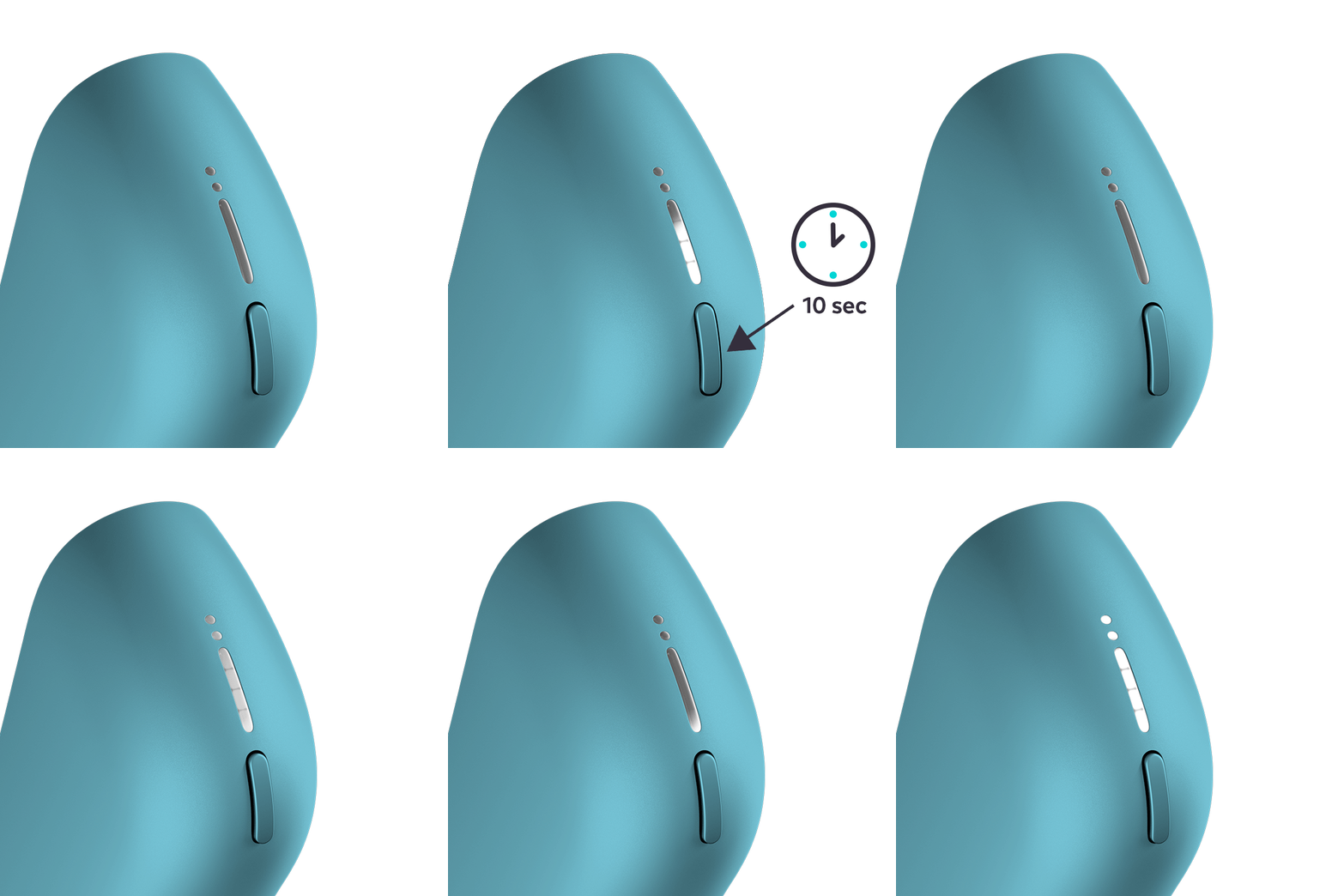
    i. Press the pocket charger button for 10 seconds. Keep it pressed while all the lights dim out.

    ii. The RESET will be confirmed when all the lights briefly blinks white.

    4. Press and release briefly the pocket charger button. Check the rounded lights  on your pocket charger;

    a. Rounded lights pulsing or stationary white. This means your holder is back ON.

    b. Rounded lights are OFF. This means your holder is still OFF

After these steps, did your holder status lights turn ON?
Yes No

Issue Resolved

    Congratulations! We are happy that you can continue enjoying your IQOS ORIGINALS DUO Pocket Charger.

    If you need further assistance with your device, please use our online diagnostic tool or contact our Customer Care Center:

    800MYIQOS (694767)

    We are frequently introducing new product options. See what’s new by visiting us online at one of our retail stores.

    This product is not risk free and provides nicotine, which is addictive. Only for use by adults.

FINISH

Firmware of your holder may be outdated!

    A firmware update may resolve your issue!

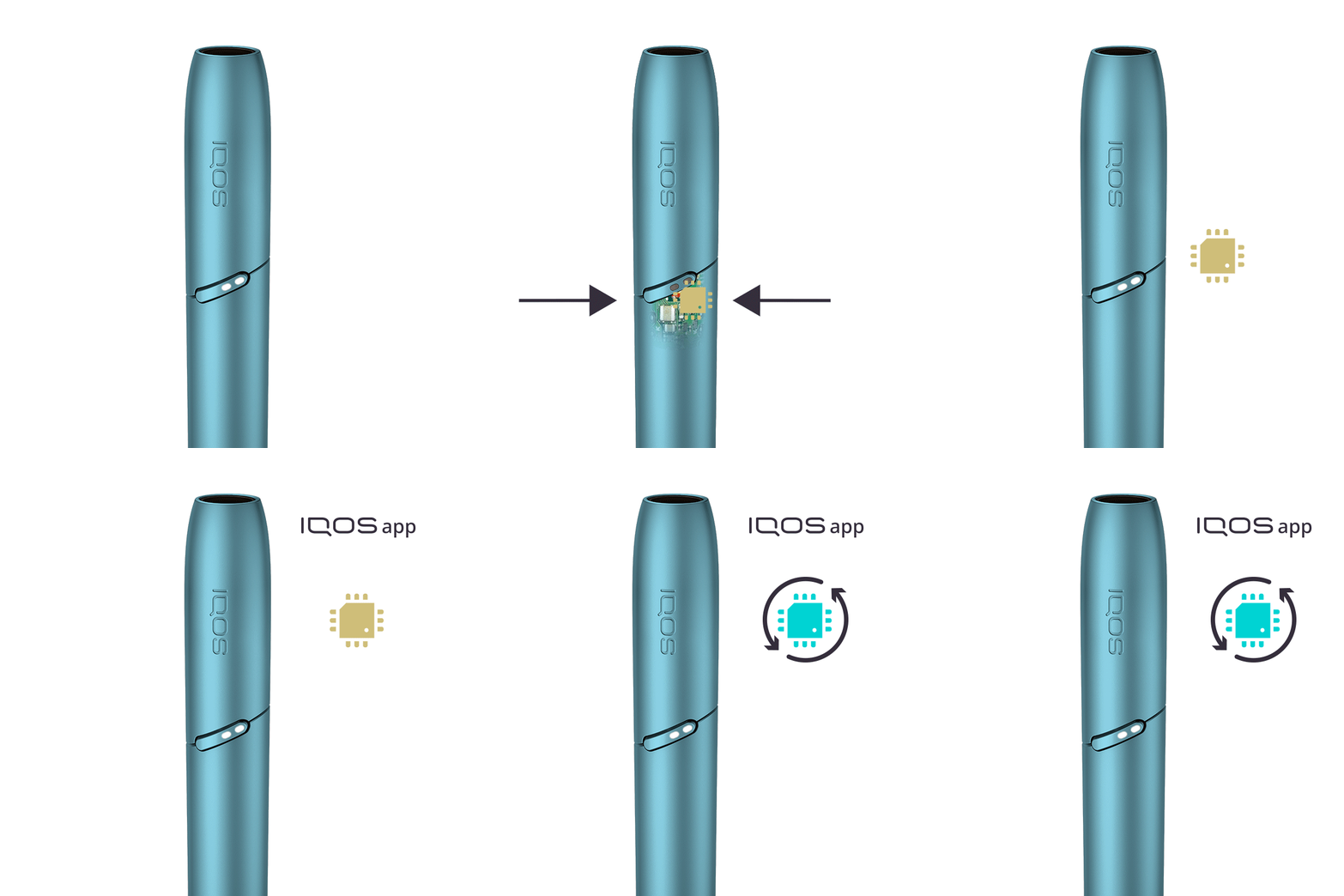
    ● As every electronic device, IQOS is also built from two core elements – physical device items and the digital working instructions, called as firmware.

    ● Firmware of your holder and pocket charger can be regularly updated for maintenance and improvement of your device performance.

    ● IQOS App is available both for desktop and mobile devices.

    After this information, how would you like to proceed:

    • Option A - Visit firmware update page

    • Option B - Do not update the firmware

After this information, how would you like to proceed?
Option A Option B

Visit Get Support Page!

    Within “Get Support” page, you can find useful tip and tricks, firmware update and more information about your device usage and maintenance. Visit get support page!

    IQOS CUSTOMER CARE

FINISH

If your device is eligible, we will place a replacement order for you

    If you proceed with eligibility check, you will not be able to return to the device diagnostics 

Would you like to continue with an eligibility check?

Do you want to proceed to eligibility check?

Click “Start” and login, select or add the correct device, and proceed with diagnostics.

START

Blinking red light

    Your holder’s heating blade might be broken

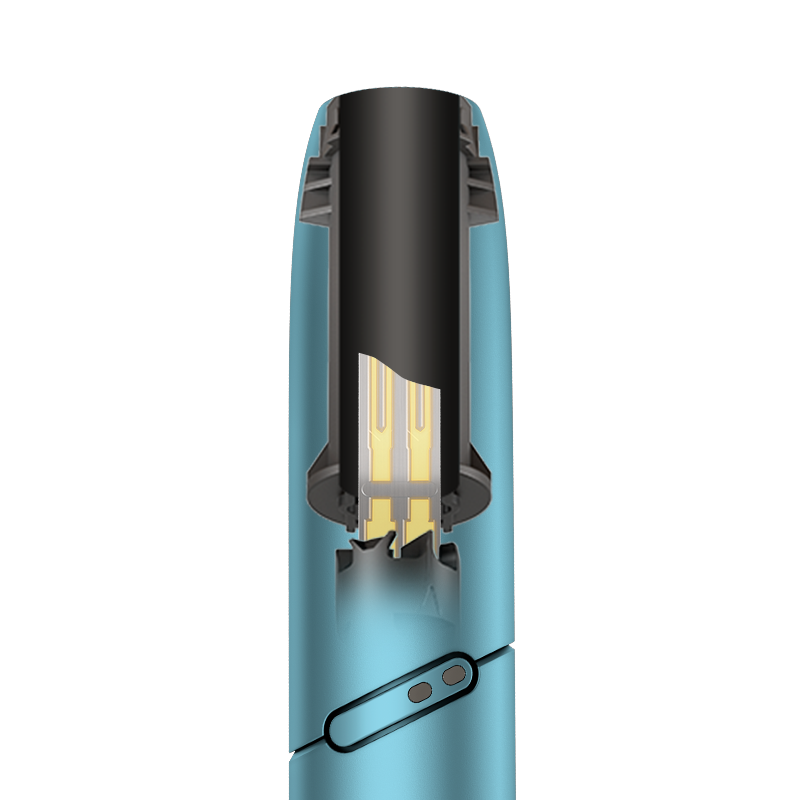
    1. Remove the holder cap completely.

    2. Visually check the heating blade to see if it is broken


Is your heating blade broken?
Yes No

If your device is eligible, we will place a replacement order for you!

    If you proceed with eligibility check, you will not be able to return to the device diagnostics

Would you like to continue with an eligibility check?
START

Blinking red light

    Your holder’s software might need a RESET

    1. Place the holder back inside the pocket charger. Ensure to place it correctly.

    ● Metal connector of the holder should be at the bottom of the pocket charger.

    2. Perform RESET for your device;

    i. Press the pocket charger button for 10 seconds. Keep it pressed while all the lights dim out.

    ii. The RESET will be confirmed when all the lights briefly blinks white..

After these steps, is your holder working?
Yes No

Issue Resolved

    Congratulations! We are happy that you can continue enjoying your IQOS ORIGINALS DUO Pocket Charger.

    If you need further assistance with your device, please use our online diagnostic tool or contact our Customer Care Center:

    800MYIQOS (694767)

    We are frequently introducing new product options. See what’s new by visiting us online at one of our retail stores.

    This product is not risk free and provides nicotine, which is addictive. Only for use by adults.

FINISH

If your device is eligible, we will place a replacement order for you!

    If you proceed with eligibility check, you will not be able to return to the device diagnostics

Would you like to continue with an eligibility check?
START

Blinking white light

    Your holder might have been exposed to outside of operating temperature

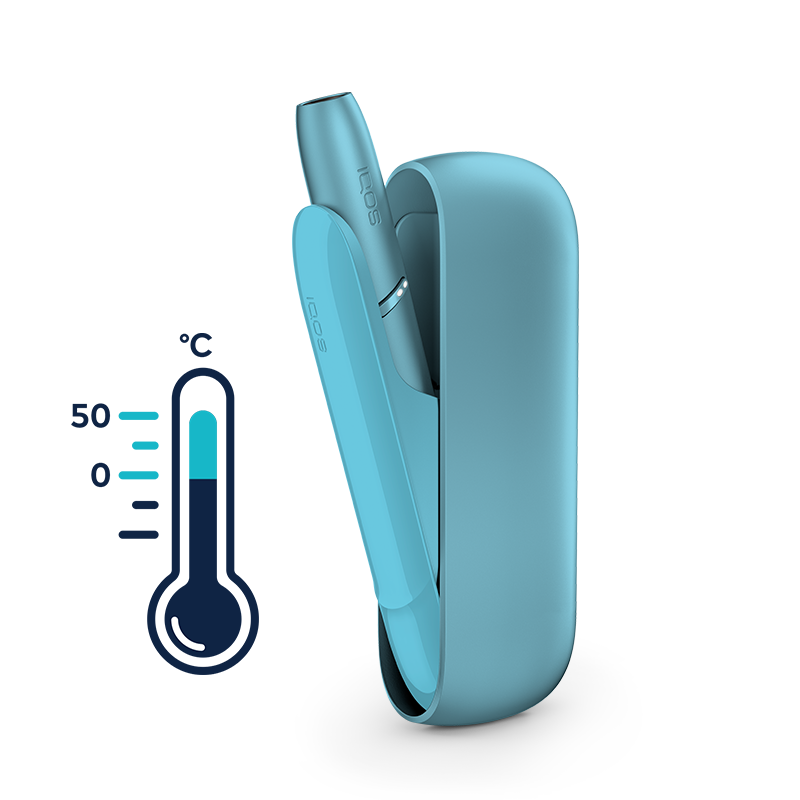
    ● Your IQOS Holder is designed to operate between 0°C and 50°C

    ● When it is exposed to too cold or too warm temperatures, you may need to let it cool down or warm it up in your pocket.

Was your IQOS exposed to too cold or too warm temperature?
Yes No

Issue Resolved

    Congratulations! We are happy that you can continue enjoying your IQOS ORIGINALS DUO Pocket Charger.

    If you need further assistance with your device, please use our online diagnostic tool or contact our Customer Care Center:

    800MYIQOS (694767)

    We are frequently introducing new product options. See what’s new by visiting us online at one of our retail stores.

    This product is not risk free and provides nicotine, which is addictive. Only for use by adults.

FINISH

Blinking white light

    Your holder self cleaning status might be in due, while the door of pocket charger left opened

    ● IQOS ORIGINALS DUO device have a self-cleaning process which automatically happens when the holder is inside the pocket charger

    ● When the pocket charger door left unclosed with the holder inside, this process cannot happen. Therefore, your holder gives this error when it is overdue

    ● While the holder is inside, always close the pocket charger door

    ● Please follow the below steps to resolve this error

    1. Take the holder out of pocket charger and place it back again

    2. Close the pocket charger door and wait for the holder to be fully charged

    3. Perform RESET for your device;

    i. Press the pocket charger button for 10 seconds. Keep it pressed while all the lights dim out.

    ii. The RESET will be confirmed when all the lights briefly blinks white.

After these steps, is your holder working?
Yes No

Issue Resolved

    Congratulations! We are happy that you can continue enjoying your IQOS ORIGINALS DUO Pocket Charger.

    If you need further assistance with your device, please use our online diagnostic tool or contact our Customer Care Center:

    800MYIQOS (694767)

    We are frequently introducing new product options. See what’s new by visiting us online at one of our retail stores.

    This product is not risk free and provides nicotine, which is addictive. Only for use by adults.

FINISH

If your device is eligible, we will place a replcacement order for you!

    If you proceed with eligibility check, you will not be able to return to the device diagnostics

Would you like to continue with an eligibility check?
START

2nd light does not turn on and 2nd experience is missing

    Your holder might have not completed the charge for 2nd experience

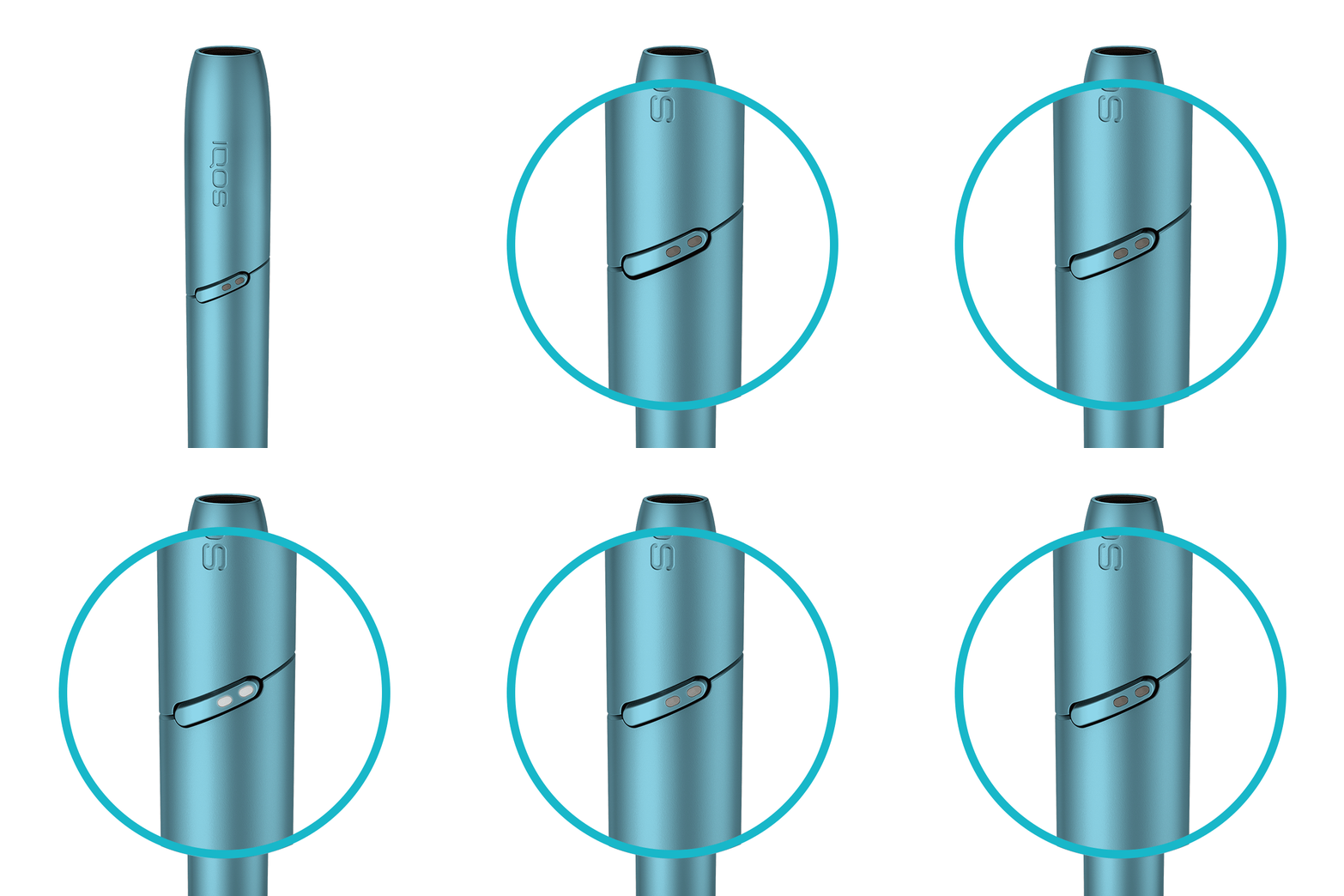
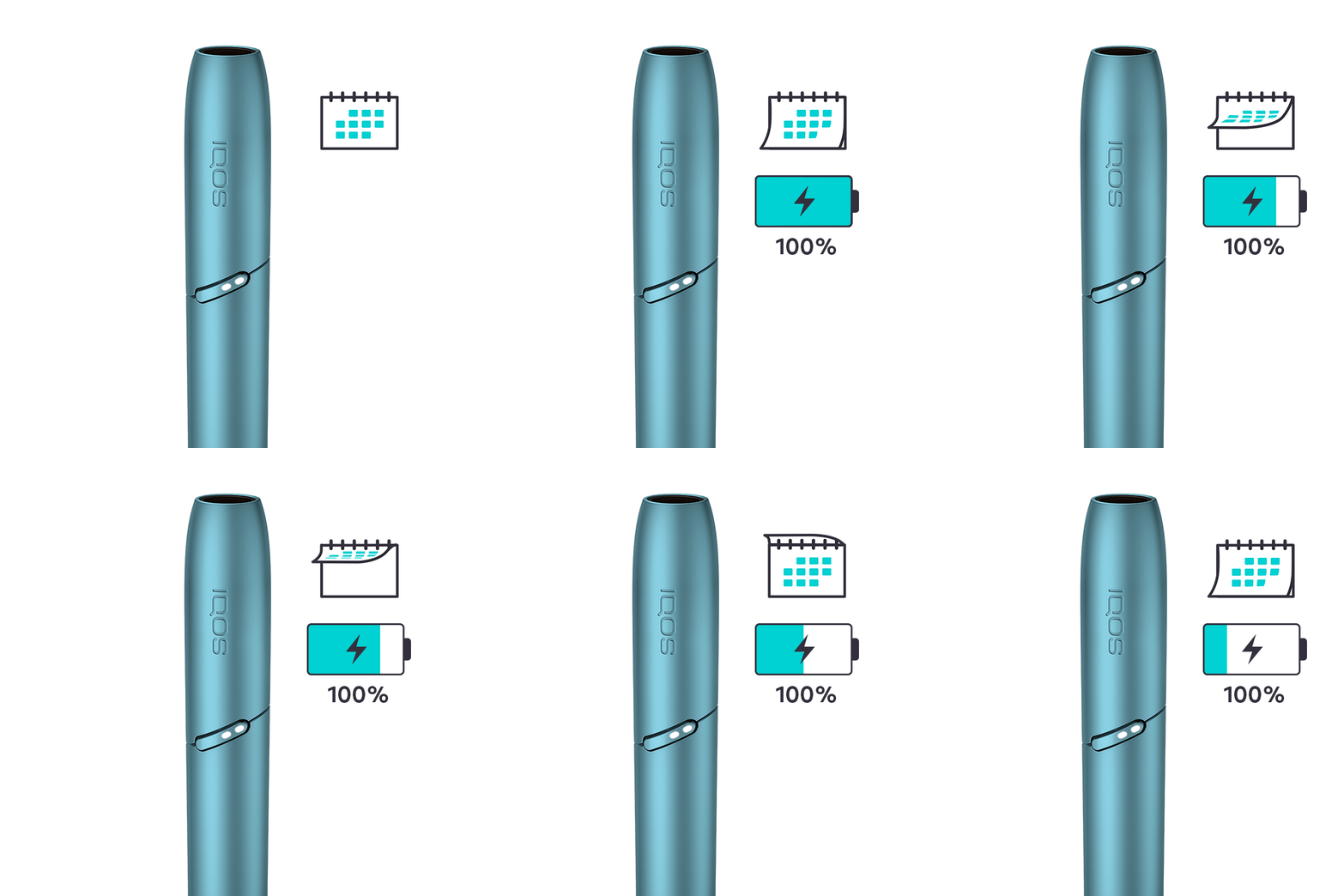
    1. Give sufficient time to the holder to be fully charged. Both LEDs on your holder must light up with a short press. See the demonstration.

    2. Make sure your pocket charger is charged enough in order to fully charge the holder

    3. Ensure the optimal charging for your device;

    ● Use official IQOS power adaptor and cable. Unofficial ones may interrupt the charging.

    ● Refrain from charging with a laptop. This may also interrupt the charging.

    ● Clean the contacts between pocket charger and holder.

After these steps, were you able to charge your holder for 2nd experience?
Yes No

Issue Resolved

    Congratulations! We are happy that you can continue enjoying your IQOS ORIGINALS DUO Pocket Charger.

    If you need further assistance with your device, please use our online diagnostic tool or contact our Customer Care Center:

    800MYIQOS (694767)

    We are frequently introducing new product options. See what’s new by visiting us online at one of our retail stores.

    This product is not risk free and provides nicotine, which is addictive. Only for use by adults.

FINISH

Firmware of your holder may be outdated!

    A firmware update may resolve your issue!

    ● As every electronic device, IQOS is also built from two core elements – physical device items and the digital working instructions, called as firmware.

    ● Firmware of your holder and pocket charger can be regularly updated for maintenance and improvement of your device performance.

    ● Firmware update can be done through IQOS firmware upgrade tool or visiting an IQOS Store.

    After this information, how would you like to proceed:

    • Option A - Visit firmware update page

    • Option B - Do not update the firmware

After this information, how would you like to proceed?
Option A Option B

Visit Get Support Page!

    Within “Get Support” page, you can find useful tip and tricks, firmware update and more information about your device usage and maintenance. Visit get support page!

    IQOS CUSTOMER CARE

FINISH

If your device is eligible, we will place a replacement order for you!

    If you proceed with eligibility check, you will not be able to return to the device diagnostics

Would you like to continue with an eligibility check?
START

Having a fully charged holder takes more than 10 mins

    Your holder might not be getting sufficient charge from your pocket charger

    1. Ensure the optimal charging for your device;

    ● Use official IQOS power adaptor and cable. Unofficial ones may interrupt the charging.

    ● Refrain from charging with a laptop. This may also interrupt the charging.

    ● Clean the contacts between pocket charger and holder.

After these steps, were you able to charge your holder fully?
Yes No

Issue Resolved

    Congratulations! We are happy that you can continue enjoying your IQOS ORIGINALS DUO Pocket Charger.

    If you need further assistance with your device, please use our online diagnostic tool or contact our Customer Care Center:

    800MYIQOS (694767)

    We are frequently introducing new product options. See what’s new by visiting us online at one of our retail stores.

    This product is not risk free and provides nicotine, which is addictive. Only for use by adults.

FINISH

Firmware of your holder may be outdated!

    A firmware update may resolve your issue!

    ● As every electronic device, IQOS is also built from two core elements – physical device items and the digital working instructions, called as firmware.

    ● Firmware of your holder and pocket charger can be regularly updated for maintenance and improvement of your device performance.

    ● Firmware update can be done through IQOS firmware upgrade toolor visiting an IQOS Store.

    After this information, how would you like to proceed:

    • Option A - Visit firmware update page

    • Option B - Do not update the firmware

After this information, how would you like to proceed?
Option A Option B

Visit Get Support Page!

    Within “Get Support” page, you can find useful tip and tricks, firmware update and more information about your device usage and maintenance. Visit get support page!

    IQOS CUSTOMER CARE

FINISH

If your device is eligible, we will place a replacement order for you!

    If you proceed with eligibility check, you will not be able to return to the device diagnostics

Would you like to continue with an eligibility check?
START

Broken heating blade

    Accidents can happen. We will support you! 

    ● Most of the cases of a broken heating blade happen due to;

    ● Exerting stress to the blade while cleaning the holder

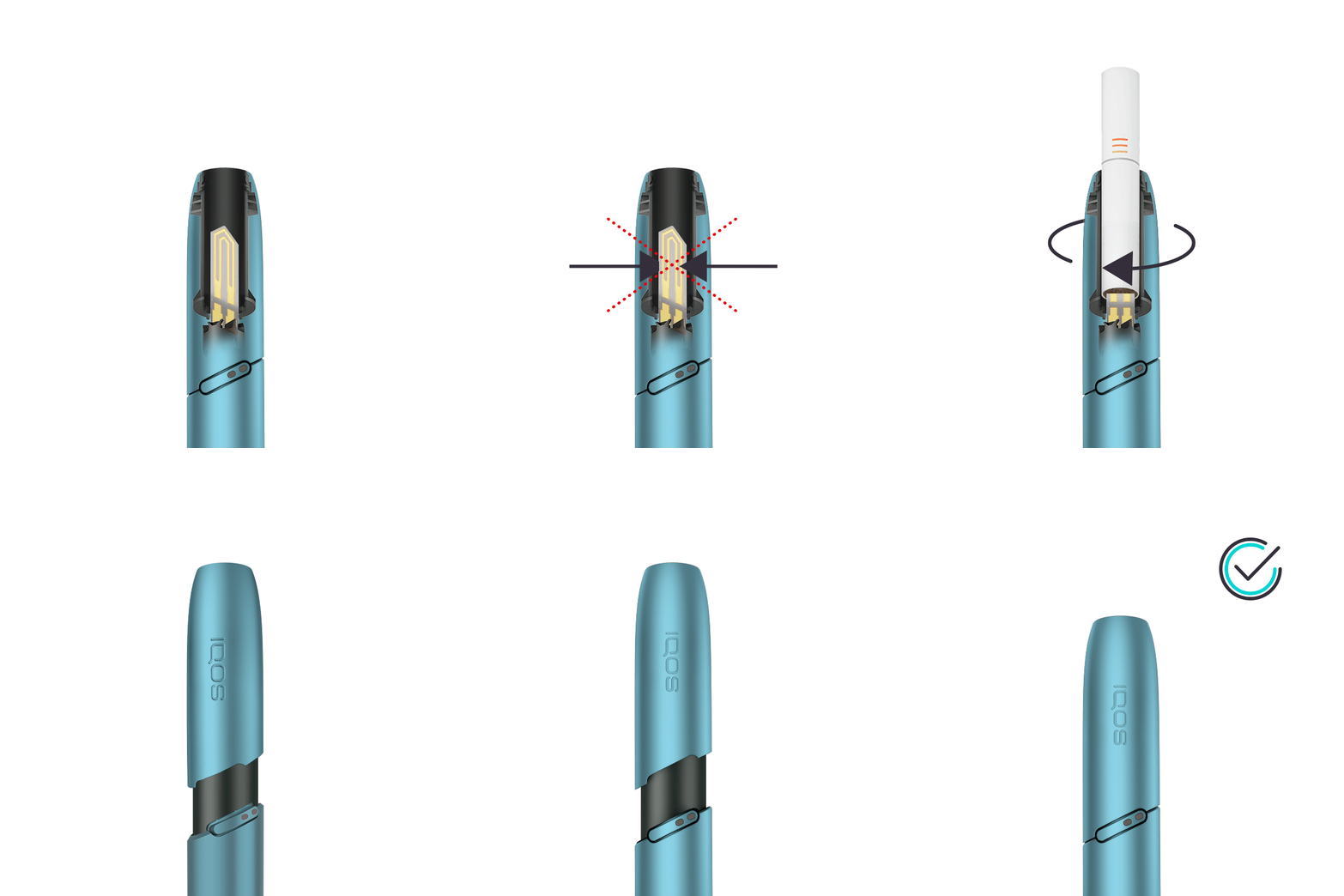
    ● Twisting the tobacco stick in the holder

    ● Incorrect insertion of the cap to the holder


    ● See the demonstration for the tips to avoid breaking the heating blade

    ● Through the accidental damage coverage offered by myIQOS, we may replace your IQOS holder with no cost.  

Find out below to see your eligibility!
Display eligibility

If your device is eligible, we will place a replacement order for you!

    If you proceed with eligibility check, you will not be able to return to the device diagnostics

Would you like to continue with an eligibility check?
START

Problem inserting tobacco stick

    There might be remaining tobacco inside your holder from the previous experience

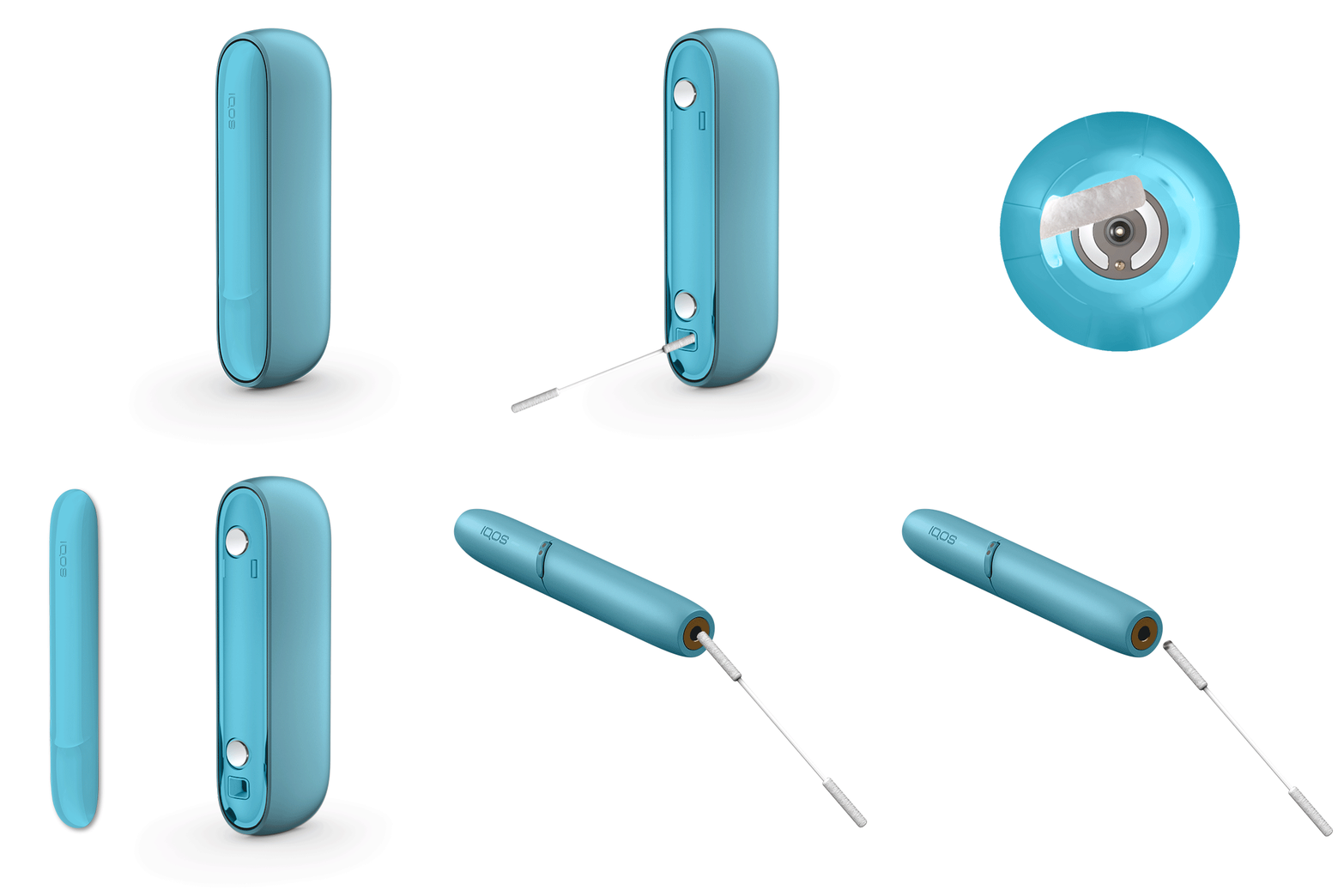
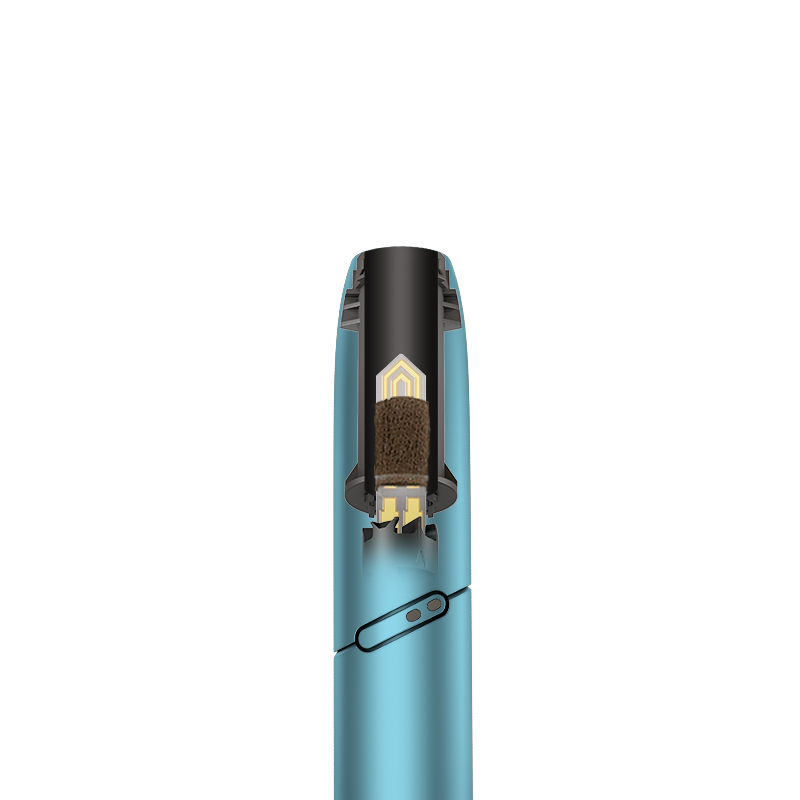
    ● After using a tobacco stick, some tobacco residues may remain in the holder causing insertion issues. See the demonstration.

    ● This usually happens when the holder cap is not pulled up before removing the used tobacco stick.

    ● In order to remove it, follow the below steps;

    1. Remove the cap from the holder by sliding it up.

    2. Gently tap the cap to the table. Use an IQOS cleaning stick and sweep the interior of the cap to remove the last bits of tobacco.

    3. Apply the same process with the holder. Refrain from exerting stress to the blade

    4. Insert the cap back to the holder correctly.

Visit “Get Support” section to learn further tips about the maintenance of your device.
Learn more

Visit Get Support Page!

    Within “Get Support” page, you can find useful tip and tricks, firmware update and more information about your device usage and maintenance. Visit get support page!

    IQOS CUSTOMER CARE

FINISH

Holder does not provide enough aerosol

    It might be the time to clean your holder!

    ● This may occur due to insufficient cleaning. In additional to the surrounding of your heating blade, you should clean the holder’s cap as well.

    ● This will allow the aerosol to flow properly. Also, you should replace your holder cap every 6 months

    ● Follow the below steps to clean your holder;


    1. Ensure to let your holder fully cool down before you start cleaning (at least 30 seconds after the last use)

    2. Slide the holder cap off and tap out any loose tobacco.

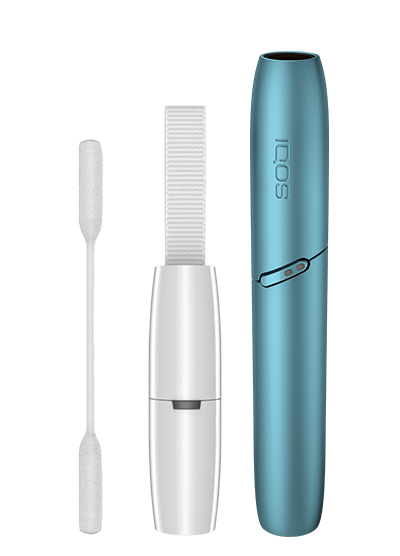
    3. Open the rotating head of the cleaning tool and insert without twisting. Gently rotate three times and remove without twisting. Gently tap your holder again for any remaining residue

    4. Open the sweeping head of the cleaning tool and align the position to the holder and the heating blade. Insert smoothly without twisting. Move sideways from left to right to remove the residue around the blade. Gently tap your holder again for any remaining residue.

    5. Use cleaning sticks to clean inside the holder without touching the heating blade. Clean also the inside of the holder cap from the bottom and the top.

    6. Refrain from applying too much pressure and touching the heating blade.

    7. Clean after each pack of the tobacco sticks to save the taste you like

Visit “Get Support” section to learn further tips about the maintenance of your device.
Learn more

Visit Get Support Page!

    Within “Get Support” page, you can find useful tip and tricks, firmware update and more information about your device usage and maintenance. Visit get support page!

    IQOS CUSTOMER CARE

FINISH

Physical Damage

    We are sorry your IQOS holder got damaged.

Are you still able to use it with this physical damage? For example; can your holder still heat the tobacco sticks?
Yes No

Not Covered

    Cosmetic damages (such as scratches, dents, broken plastic, hairline cracks, discoloration), damage or failure caused by normal wear and tear of your device are excluded from voluntary warranty and myIQOS accidental damage coverage

    Our online store offers a wide range of accessories that could help you minimize the impact of the cosmetic damage.

    If you wish to reach a customer service representative, visit “contact us” page to choose the channel of your preference.

    IQOS CUSTOMER CARE

FINISH

If your device is eligible, we will place a replacement order for you!

    If you proceed with eligibility check, you will not be able to return to the device diagnostics

Would you like to continue with an eligibility check?
START

I couldn’t find my issue amongst these options

    When your IQOS is not functioning as expected, usually some generic steps help to resolve the issue. Let’s start with RESET

    1.Place the holder inside the pocket charger. Ensure to place it correctly.

    ● Metal connector of the holder should be at the bottom of the pocket charger.


    2. Perform RESET for your device;

    i. Press the pocket charger button for 10 seconds. Keep it pressed while all the lights dim out.

    ii. The RESET will be confirmed when all the lights briefly blinks white.

After the RESET, is your issue resolved?
Yes No

Issue Resolved

    Congratulations! We are happy that you can continue enjoying your IQOS ORIGINALS DUO Pocket Charger.

    If you need further assistance with your device, please use our online diagnostic tool or contact our Customer Care Center:

    800MYIQOS (694767)

    We are frequently introducing new product options. See what’s new by visiting us online at one of our retail stores.

    This product is not risk free and provides nicotine, which is addictive. Only for use by adults.

FINISH

I couldn’t find my issue amongst these options

    A thorough cleaning of your device may help!

    1.Perform cleaning for your device

    ● Always use IQOS original cleaning tool and sticks

    ● Clean your holder, holder cap, and connectors between your holder and the pocket charger

    ● Change your holder cap every 6 months

After the cleaning, is your issue resolved?
Yes No

Issue Resolved

    Congratulations! We are happy that you can continue enjoying your IQOS ORIGINALS DUO Pocket Charger.

    If you need further assistance with your device, please use our online diagnostic tool or contact our Customer Care Center:

    800MYIQOS (694767)

    We are frequently introducing new product options. See what’s new by visiting us online at one of our retail stores.

    This product is not risk free and provides nicotine, which is addictive. Only for use by adults.

FINISH

I couldn’t find my issue amongst these options

    Your issue might have been caused by charging.

    1.Ensure the optimal charging for your device;

    ● Use official IQOS power adaptor and cable. Unofficial ones may interrupt the charging.

    ● Refrain from charging with a laptop. This may also interrupt the charging.

After using official power adaptor and cable, is your issue resolved?
Yes No

Issue Resolved

    Congratulations! We are happy that you can continue enjoying your IQOS ORIGINALS DUO Pocket Charger.

    If you need further assistance with your device, please use our online diagnostic tool or contact our Customer Care Center:

    800MYIQOS (694767)

    We are frequently introducing new product options. See what’s new by visiting us online at one of our retail stores.

    This product is not risk free and provides nicotine, which is addictive. Only for use by adults.

FINISH

Firmware of your holder may be outdated!

    A firmware update may resolve your issue!

    ● As every electronic device, IQOS is also built from two core elements – physical device items and the digital working instructions, called as firmware.

    ● Firmware of your holder and pocket charger can be regularly updated for maintenance and improvement of your device performance.

    After this information, how would you like to proceed:

    • Option A - Visit firmware update page

    • Option B - Do not update the firmware

After this information, how would you like to proceed?
Option A Option B

Visit Get Support Page!

    Within “Get Support” page, you can find useful tip and tricks, firmware update and more information about your device usage and maintenance. Visit get support page!

    IQOS CUSTOMER CARE

FINISH

If your device is eligible, we will place a replacement order for you!

    If you proceed with eligibility check, you will not be able to return to the device diagnostics

Would you like to continue with an eligibility check?
START

Duration of 2nd experience is less than what it is designed for

    COMMUNICATE:

    ● The holder is designed to provide you 2 experiences, each have up to 6 mins and/or 14 puffs whichever comes first


    CONFIRM OR TEST TOGETHER WITH THE CONSUMER:

    1. Advice the customer to use the holder and holder cap fully cleaned. 

    2. Check if it happens once or intermittently. If this was the case, it’s likely to be an issue with the consumable and not the device. Heat sticks may or may not leave a stain once they have been used / No stain mark is not a sign the tobacco was not heated properly.

    3. Advice to test the puffs and inhalation duration.

    4. Advice to keep the track of the time passed and the puffs while taking this test. The time it takes for the device on the initial heating (~ 20 seconds) is also considered to be part of the 6 minutes.

    5. Does it deliver 2 experiences with 14 puffs OR 2 experiences with 1st one is around 6 minutes and 2nd one is at least between 4:30 – 6 minutes?

    DECIDE:

    ● According to the above steps and the consumer’s claim, make the decision;

    • Option A: Inhalation delivery duration and puffs are within acceptable limits, therefore, DO NOT replace. [I confirm that there is no need of replacement]

    • Option B: Inhalation delivery duration and puffs are out of acceptable limits. Proceed with the next step communication [There might be a need of holder replacement]


Choose the option from the below to continue
Option A Option B

Issue Resolved

    Congratulations! We are happy that you can continue enjoying your IQOS ORIGINALS DUO Pocket Charger.

    If you need further assistance with your device, please use our online diagnostic tool or contact our Customer Care Center:

    800MYIQOS (694767)

    We are frequently introducing new product options. See what’s new by visiting us online at one of our retail stores.

    This product is not risk free and provides nicotine, which is addictive. Only for use by adults.

FINISH

Firmware of the customer’s holder may be outdated!

    A firmware update may resolve the issue!

    COMMUNICATE

    ● As every electronic device, IQOS is also built from two core elements – physical device items and the digital working instructions, called as firmware.

    ● Firmware of your holder and pocket charger can be regularly updated for maintenance and improvement of your device performance.

    ● Firmware update can be done through IQOS firmware upgrade tool or visiting an IQOS Store.

    ● IQOS App is available both for desktop and mobile devices. 

    After this information, ask if the customer would like to update their firmware and choose the option accordingly.

    • Option A - Customer will update their firmware

    • Option B - Customer is not willing to update their firmware

After this information, ask if the customer would like to update their firmware and choose the option accordingly.
Option A Option B

Issue Resolved

    Congratulations! We are happy that you can continue enjoying your IQOS ORIGINALS DUO Pocket Charger.

    If you need further assistance with your device, please use our online diagnostic tool or contact our Customer Care Center:

    800MYIQOS (694767)

    We are frequently introducing new product options. See what’s new by visiting us online at one of our retail stores.

    This product is not risk free and provides nicotine, which is addictive. Only for use by adults.

FINISH

Duration of 2nd experience is less than what it is designed for

    Customer’s holder battery capacity might be degraded by time – which is normally out of warranty

    COMMUNICATE:

    ● As any other electronic devices, the battery performance of the holder reduces over time. This is a normal situation for a battery performance on electronics.

    ● The reduced battery performance may affect the duration of the 2nd experience

    ● According to the electronics industry standards and our warranty terms, battery degradations are out of warranty.

    ● However, our customer’s satisfaction is our top priority.

    ● Let’s check if your device is still under warranty, if so, we may have the possibility to replace your holder.


Find out below to see the eligibility!
Dsiplay eligibility

If your device is eligible, we will place a replacement order for you!

    If you proceed with eligibility check, you will not be able to return to the device diagnostics

Would you like to continue with an eligibility check?
START

Great!

Enjoy using your IQOS

DONE

This product is not risk free and provides nicotine, which is addictive.
Only for use by adults.

  1. Home
  2. A1406_IODUO_GLOBAL

Helpful links

  • Our Locations
  • The Science
  • Buy Iluma Series
  • Buy Terea
  • Book an Appointment
  • Registration Program Terms and Conditions
  • Goodwill Voucher Terms and Conditions

CUSTOMER CARE

  • Get Support
  • FAQs
  • Warranty
  • Contact Us

SOCIAL

  • Facebook
  • Twitter
  • Youtube

Language

We accept

We accept We accept

Shipping Partners

Shipping Partners Shipping Partners

© 2020 Philip Morris Products SA. All rights reserved.

  • Terms of Sale
  • Privacy Notice
  • Terms of Use
  • Cookies
  • Services & privileges
  • English
  • Arabic


Please enter your date of birth to confirm you are an adult [18+] smoker or user of nicotine products.


Please provide month of birth
Please provide year of birth

Are you an adult (18+) smoker or user of any other nicotine products?

You must be 18 or over to access materials on this site.

We care

This website contains information about smoke-free products and we need your age to make sure that you are an adult in the United Arab Emirates who would otherwise continue to smoke or use tobacco products. PMI’s smoke-free products are not an alternative to quitting and are not designed as cessation aids. They are not risk free. They provide nicotine, which is addictive. Only for use by adults. Please visit Important Information page of this website for further risk information.

Country redirect

IQOS

Please note this site is intended for United Arab Emirates. In order to ensure compliance with local legal requirement, we need to redirect you to your country of origin.

CONTINUE Arrow right